Project reporting
For anything big enough to be a “project”, it should be in Gitlab with basic information (labels describing customer and tasks), and then approximate monthly time via the monthly time planning spreadsheet.
Halli is the official time record, but Halli projects do not necessarily line up with practical projects (projects can pull from various funding sources and Halli is not precise enough for a report).
summary
If it passes the “project” threshold, make an issue in Gitlab.
At key stages (at least before committing), give a quick report in a RSE meeting to get any possible extra advice and a go/no-go decision [note: The main purpose is extra advice. The go/no-go decision provides some protection for you: a time for reflection and to avoid over-committing without it being your fault].
At the end of each month, make sure the rse-timetracking spreadsheet reflects what you actually did - more or less. Every “project” you worked on should be here with a
#NNNtag [note: motivation to not make too many projects, right?].Keep the rse-timetracking spreadsheet up to date with committed time in the future.
See also
Garage supporter - expectations for helping in garage.
When is something a “project” and not “support”?
Things generally indicating a “project”:
Requires 3 focus days or more on our part.
Anything providing its own funding.
Requires a fair amount of planning and documentation of that planning, or coordinating multiple RSEs working together.
A “Retainer” project, where we are paid for long-term work on many various small things. [note: In this case, you would probably use the retainer project even if there are other “projects” longer than three days going on, since there is not much purpose to show in more detail]
Every course we teach (larger than a workshop).
Is a concrete future possibility, for example we have been written into a grant application at X months. [note: Having a list of where we have been written into grants is also useful for our reporting] (label:
Status::0-WaitingForGrant)
Things generally indicating not a project:
Requires less than a week. [note: Yes, there is an overlap with projects.]
You won’t remember to update the issue as it progresses.
No value in listing it separately in reports to management (it looks trivial and dilutes the other good work we do).
Someone else could easily take it over. [note: So that long-term support can be dropping by garage and seeing who is there.]
One person can do it quickly with little interaction needed from others, or it’s just a “one person needs to remember to do this” on their own to-do list.
Spending a few hours or even a few days teaching or attending a course or event if it is not mainly organized by us.
The boundary may not be clear here and you can make a judgment call.
How much to subdivide projects, or use one tracking project for many
small things? Don’t make more projects just to look busy - you don’t
need to. You can instead make a tracking issue for a theme, if you
need to report somehow (Examples: XXX group retainer, MLops
support, Monitor GPU efficiency and contact users).
rse-projects Gitlab repository
We have an internal repository rse-projects in the Aalto Gitlab
(AaltoRSE organization). This contains the metadata of all the
projects. Everything that is big enough to be a “project” should
have a Gitlab issue. This provides a tracking number RSE#NNN
which is the permanent identifier and is automatically parsed for
reports.
Create a new issue and use the issue template (Default). Fill it
out well enough to give someone an idea what the project is about/who
is involved if you weren’t available. Think 3-5 minutes of work at
maximum. Add all relevant issue labels.
RSE time planning spreadsheet
Link: google drive search for “RSE time planning”
This is the person × month spreadsheet used for long-term time allocation. The spreadsheet does not have to have anything classified as “garage” or “support” in it (that fits in spare unallocated time). A person should not usually go above 80% full (to have time for these other things).
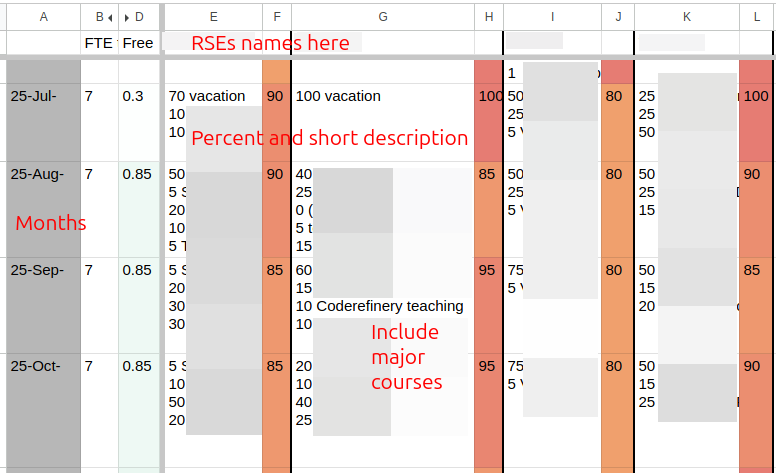
An example of the RSE time planning spreadsheet. This was the early days so doesn’t meet all the current standards, but you see people, months, percentages, and descriptions.
What do the numbers mean? Fraction of your actual time, so that (for example) it is the percent value you would give for the Person-Months in an EU or Halli report.
For past months, values should match up reasonably closely with
your actual time distribution. Every “project” worked on should be
included with a tag #NNN [note: This is motivation to not make too many “projects” when not needed]. Update the spreadsheet each
month when you make your Halli report [note: if you don’t do Halli, use the Halli reminders to remind you to do this].
For future months, this should indicate your general expected level of busyness, for time-planning purposes. For example, you may not know what project you will be working on, but know that 50% of your time is booked for Institute X’s support. Record a “50” there.
Not everything in the spreadsheet has to be a project. Things such as “vacation”, “RSE conference”, “misc small AI consultations”, etc. can all be recorded.
Reporting and approvals by step
Pre-discussion: (there is no project yet, you are just talking to people about a future idea). You don’t need to do any reporting, but if this is a concrete idea (for example a grant has been submitted), you can make tracking issue with the state
Status::0-WaitingForGrantorStatus::0-Leadso we can track possible upcoming commitments.Idea meeting (possibly with supervisor): Make the full Gitlab issue. Give a report to the RSE weekly meeting and ask for any other feedback and a “go/no-go” decision.
Technical planning: There is usually not that much to update, but one should make sure time estimates, etc. are approximately correct. Give a report of the plan to the RSE weekly meeting and ask for any other feedback and a “go/no-go” decision.
Working on it (label:
Status::3-InProgress): Keep the RSE time scheduling spreadsheet up to date month-by-month. Important updates and news can go to the Gitlab issue, and use chat as needed.Done (label:
Status::6-Done): Move the issue to state “done”, update the summary and, if possible, ask how much time we saved the customer and report it with/timesaved. If it’s mostly done but you are waiting for info from the customer, you can move it to start “reporting”.Maintenance (label:
Status::7-Maintenance): Use this state if the main work is done, but it remains under our maintenance (we may be called to fix stuff for it later). It is important we can say how much of this work we do. Don’t forget to update maintenance time to therse-timetrackingspreadsheet.
Example reports to management
This section shows what kind of reports we can make with the data, so you can see the purposes of the reports - if you can see the output, that may help with motivation to produce the data. See 2025 Aalto RSE report.

Showing the projects per school. This shows funders where our time goes. (Note it does not consider time spent per project).
See the full report for more figures.
TODO: add a report that extracts times from the spreadsheet and metadata from Gitlab and makes a actual time report per-year.
Below is an example from the automatically-generated text report that
is sometimes requested. It has the issue title, various metadata from
labels and /-commands, and the /summary summary:
Adding functionality to [some-software] (#nnn / ELEC)
Feb 202x
Contacts: user.name@example.com
Time saved / spent: 2w / 2w5d1h
Size: 2-M
Researcher needed to access some information in [some software] that was not included in the Python API. We extended the API to provide the information and submitted a pull request to the original repository.